
Just a guy in Vermont trying to connect all the dots...

Dan York
Author's posts
Feb 07
Google I/O 2011 Event Sells Out in 59 Minutes!
For the past few years, Google’s “I/O” developer conference has been THE conference for many developers to attend. It’s the place where you go to understand the latest and greatest tools and services coming out of Google… and where you can get to participate ahead of everyone else. Two years ago I/O attendees were the first to get Google Wave accounts… last year every attendee got an Android phone…
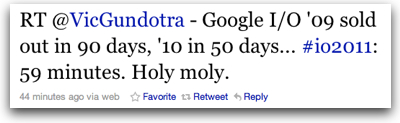
This year proved no different – the Google I/O 2011 registration opened up this morning … and then sold out less than an hour later!
To put this in perspective… about 5,000+ developers attend the event!
Kudos to Google for having created a conference that so many people want to attend.
The Twitter stream tells the tale…
And this compilation of tweets from Google’s Vic Gundrota shows it, too:
P.S. Needless to say, some folks who had been eagerly waiting to register weren’t too pleased, particularly given some of the apparent difficulties with getting access to the registration site.
Feb 05
Nodester Continues to Improve Its Free Hosting For Node.js Apps
 Looking for a way to easily try out Node.js? Or have an app idea and want a free place to host it?
I continue to be quite impressed with what Chris Matthieu is doing with his Node.js hosting service now called “Nodester“. I first wrote about the service back in January when Chris put it online and called it “NodeFu.” Since then he
- changed the name to Nodester
- moved the source code to http://github.com/nodester
- added a second core contributor and made a TON of enhancements
- added a command-line interface to make apps even easier to deploy
- came out with a screencast showing how to deploy an app on Nodester
All in all I think it’s rather cool what he’s doing… and he’s enabling all of us who are interested to have an easy way to play with Node.js. Fun stuff!
Feb 04
Video: How to use the new debugger client in Node.js
How does the new debugger work in the latest version of Node.js? my colleague Chris Matthieu recently pointed me to this screencast from Ryan Dahl. It looks cool…
New built-in V8 debugger client for Node.js from ry on Vimeo.
Feb 04
Using PostBin to Debug Webhooks
Recently I was trying to debug a python app that ran on Tropo.com Scripting and made a web call back to an application on another server. I wanted to see exactly what was being sent in the HTTP POST rom Tropo to the other server… and that’s when my colleague Mark Headd pointed me over to PostBin.org:
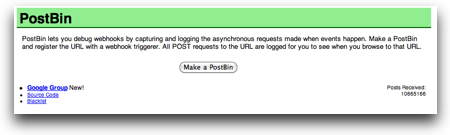
PostBin is very cool because literally all you do is click the “Make a PostBin” button and then you get a URL that looks like
http://www.postbin.org/1dlalso
Now you just do a HTTP POST to that URL and… ta da… the results of your post appear on the new webpage.
It’s a very cool way to debug webhooks!
P.S. Obviously there is no language limitation here. I happened to use python because that was what I was debugging, but you can use PostBin with ANY language that is sending HTTP connections.
Feb 03
Textastic – a great iPad code editor
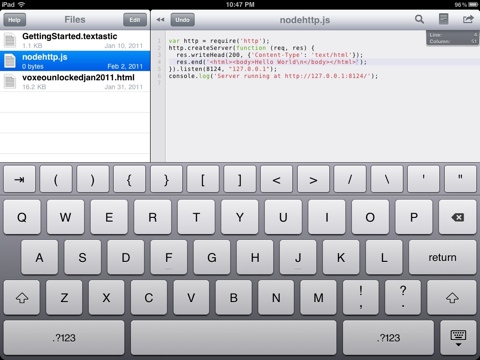
Lately I have been looking for a code editor for the iPad … and am VERY impressed so far by Textastic. It is not a free app, but it has been well worth the money already. with it, i was able to very easily create the rough draft of an HTML email newsletter on my flight down to Florida… i have also done some codinv in it…
The are a range of great featurea, but the most prominent one is the simple extra row on top of the keyboard that gives you characters commonly used in programming. HUGE timesaver! as shown in the image below, you can work with multiple files… all in all I am extremely impressed. Many thanks to the friends on Twitter who suggested it!
Jan 29
Using LESS To Create Dynamic Stylesheets with Node.js
Have you been working with Cascading Style Sheets (CSS) and found yourself wishing you could make those sheets more, oh, dynamic? Like, for instance, including variables so that you could easily change colors or spacing throughout a stylesheet? There are a number of solutions out there to do this, but one I stumbled upon recently is “LESS“. Here’s a graphic from the LESS site that shows exactly this usage with variables:
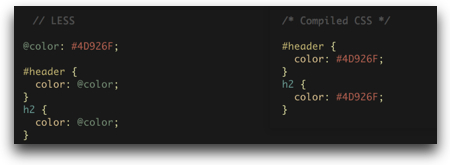
You can also do some very cool things with easily nesting rules and creating functions that can calculate values for other rules.
All in all it looks very cool… and it can run either in a client browser or, of more interest to me, server-side using Node.js. I have a site idea where this just might come in handy…
P.S. Any other modules for Node.js for doing stylesheet creation that you all like?
Jan 28
Meet the Author and Discuss UC Security – Next Week In Miami
As I mentioned on both the VOIPSA blog and my Disruptive Telephony site, I'll be in Miami next week, February 2-4, speaking at the SIP Trunking Workshop and Cloud Communications Summit about Unified Communications security.
If you are there at any of the events in Miami (my schedule is online), please do say hello... and if you'd like to meet, please send me an email or contact me on Twitter.
P.S. I may have a few books with me... ;-)
Jan 26
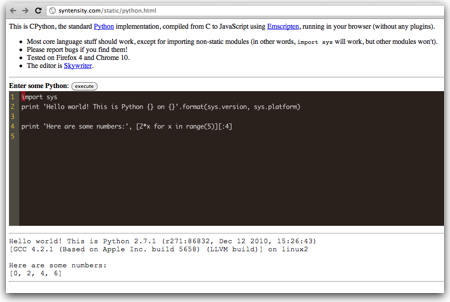
Test Out Python… Directly In Your Web Browser
Pretty cool little site to test out python directly inside your web browser (found via Hacker News):
You just type in some python code and press the “Execute” button. Now, sure, it doesn’t have support for much outside the very core language… and you could get all of that by simply flipping to a terminal window and using python from the command line.
Still, it’s a fun way to be able to show people new to python what they can do… and a cool proof-of-concept of running python directly inside your web browser!
Jan 25
Node.js, Doctor’s Offices and Fast Food Restaurants – Understanding Event-driven Programming

Are you struggling to understand “event-driven” programming? Are you having trouble wrapping your brain around “blocking” vs “non-blocking” I/O? Or are you just trying to understand what makes Node.js different and why so many people are talking about it? (and why I keep writing about it?)
Try out one of these analogies…
The Doctor’s Office Reception Line Analogy
In the excellent episode 102 of the Herding Code podcast, Tim Caswell relates event-driven programming to standing in the line at a doctor’s office to see the receptionist. Inevitably, at least here in the USA, there are additional forms to fill out with insurance info, privacy releases, etc.
A Traditional Model
In a traditional thread-based system, when you get to the receptionist you stand at the counter for as long as it takes you to complete your transaction. If you have to fill out 3 forms, you would do so right there at the counter while the receptionist just sits there waiting for you. You are blocking her or him from servicing any other customers.
The only real way to scale a thread-based system is to add more receptionists. This, however, has financial implications in that you have to pay more people and physical implications in that you have to make the room for the additional receptionist windows.
Events To The Rescue
In an event-based system, when you get to the window and find out you had to complete additional forms, the receptionist gives you the forms, a clipboard and a pen and tells you to come back when you have completed the forms. You go sit down in the waiting and the receptionist helps the next person in line. You are not blocking her from servicing others.
When you are done with your forms, you get back in line and wait to speak with the receptionist again. If you have done something incorrectly or need to fill out another form, he or she will give you the new form or tell you the correction and you’ll repeat the process of going off, doing your work, and then waiting in line again.
This system is already highly scalable (and is in fact used in most doctor’s offices I visit). If the waiting line starts getting too long, you can certainly add an additional receptionist, but you don’t need to do so at quite the rate of a thread-based system.
The Fast Food Restaurant Analogy
It struck me that this is also very similar to ordering your food at a fast-food restaurant or street vendor.
The thread-based way would be to get to the front of the line, give your order to the cashier and then wait right there until your order was cooked and given to you. The cashier would not be able to help the next person until you got your food and went on your way. Need to service more customers… just add more cashiers!
Of course, we know that fast food restaurants don’t work that way. They are very much event-driven in that they try to make those cashiers as efficient as possible. As soon as you place your order, it’s sent off for someone to fulfill while the cashier is still taking your payment. When you are done paying, you have to step aside because the cashier is already looking to service the next customer. In some restaurants, you might even be given a pager that will flash and vibrate when your order is ready for pickup (My local Panera Bread does this). The key point is that you are not blocking the receiving of new orders.
When your food is set, the cashier – or someone – will signal you by calling out your name, order number or triggering your pager. The event of your order being ready causes the person to perform some function/action. (In programming lingo, this would be thought of as a “callback function“.) You will then go up and get your food.
So What Does This Have To Do With Node.js?
The “traditional” mode of web servers[1] has always been one of the thread-based model. You launch Apache or any other web server and it starts receiving connections. When it receives a connection, it holds that connection open until it has performed the request for the page or whatever other transaction was sent. If it make take a few microseconds to retrieve a page from disk or write results to a database, the web server is blocking on that input/output operation. (This is referred to as “blocking I/O“.) To scale this type of web server, you need to launch additional copies of the server (referred to as “thread-based” because each copy typically requires another operating system thread).
In contrast, Node.js uses an event-driven model where the web server accepts the request, spins it off to be handled, and then goes on to service the next web request. When the original request is completed, it gets back in the processing queue and when it reaches the front of the queue the results are sent back (or whatever the next action is). This model is highly efficient and scalable because the web server is basically always accepting requests because it’s not waiting for any read or write operations. (This is referred to as “non-blocking I/O” or “event-driven I/O“.)
To put it a bit more concretely, consider this process:
- You use your web browser to make a request for “/about.html” on a Node.js web server.
- The Node server accepts your request and calls a function to retrieve that file from disk.
- While the Node server is waiting for the file to be retrieved, it services the next web request.
- When the file is retrieved, there is a callback function that is inserted in the Node servers queue.
- The Node server executes that function which in this case would render the “/about.html” page and send it back to your web browser.
Now, sure, in this case, it may only take microseconds for the server to retrieve the file, but..
microseconds matter!
Particularly when you are talking about highly-scalable web servers!
This is what makes Node.js different and of such interest right now. Add in the fact that it also uses the very common language of JavaScript, and it is a very easy way for developers to create very fast and very scalable servers.
Do these analogies help? Do have another analogy you use to explain “event-driven programming” or “event-driven I/O”?
[1] While I’m talking about “web servers” here, Node.js lets you write all sorts of different types of servers for many other protocols beyond HTTP. They all have similar issues (blocking vs non-blocking I/O).
Image credit: gerry balding on Flickr