
Just a guy in Vermont trying to connect all the dots...

Dan York
Author's posts
Jun 28
How IPv6 Will Kill Telecom – And What We Need To Do About It

How badly will IPv6 screw up telecommunications? Where are the areas of telecom that will see the greatest impact? And what can be done to fix it? How badly will IPv6 screw up telecommunications? Where are the areas of telecom that will see the greatest impact? And what can be done to fix it? With the recent buzz around World IPv6 Day and the exhaustion of top-level IPv4 address allocations, organizations are starting to seriously look at exactly what is involved with migrating to IPv6... and asking questions about what this means for all their VoIP and Unified Communications systems. Given that the reality is that a "IPv6-only" world is a distant future, questions are particularly being asked around how those telecommunications systems will work during the transition period from IPv4 to IPv6. In this session, Voxeo’s Dan York will explore where IPv6 and telecom play nice together and where there are serious minefields that may restrict telecom from working over IPv6 In this session, Voxeo’s Dan York will explore where IPv6 and telecom play nice together and where there are serious minefields that may restrict telecom from working over IPv6
Jun 28
How IPv6 Will Kill Telecom – And What We Need To Do About It

How badly will IPv6 screw up telecommunications? Where are the areas of telecom that will see the greatest impact? And what can be done to fix it? How badly will IPv6 screw up telecommunications? Where are the areas of telecom that will see the greatest impact? And what can be done to fix it? With the recent buzz around World IPv6 Day and the exhaustion of top-level IPv4 address allocations, organizations are starting to seriously look at exactly what is involved with migrating to IPv6... and asking questions about what this means for all their VoIP and Unified Communications systems. Given that the reality is that a "IPv6-only" world is a distant future, questions are particularly being asked around how those telecommunications systems will work during the transition period from IPv4 to IPv6. In this session, Voxeo’s Dan York will explore where IPv6 and telecom play nice together and where there are serious minefields that may restrict telecom from working over IPv6 In this session, Voxeo’s Dan York will explore where IPv6 and telecom play nice together and where there are serious minefields that may restrict telecom from working over IPv6
Jun 23
Demonstrating IPv6 User Interface Issues – with the web site theme!
Rather ironically, I have found that the WordPress theme I’ve been initially using for this site demonstrates perfectly the kind of user interface display issues that will bite so many developers with IPv6. Here’s a screenshot of me visiting the site from an IPv6 site (part of the address covered for security purposes):
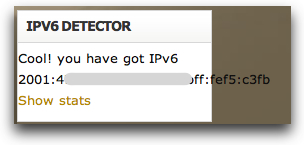
As you can see, it goes well outside the column containing the box with the address in it.
In contrast, over on Code.DanYork.com I’m using a different theme and the same exact widget displays the IPv6 address fine there:
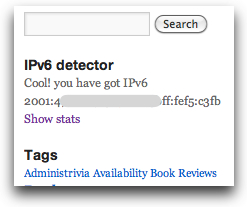
The big difference is the style sheets use a smaller font size and the column is also bigger.
I’m not too worried about the display here in the current theme because I’m going to be changing the theme for a couple of reasons (it may even have changed already by the time you read this post). But it serves as precisely the kind of user interface issue that application developers will need to examine.
Jun 21
Migrating Apps to IPv6 Now Available For Purchase at O’Reilly.com
I’m very pleased to announce that “Migrating Applications to IPv6” is now available for purchase as an eBook from O’Reilly Books:

The book is available in the formats of ePub, Mobi and PDF and should work with any eBook reader out there, including the iPad, Kindle, Nook, iPhone, etc.
The beautiful thing about purchasing the book as an eBook from O’Reilly is that you will be notified as soon as there are any updates. Given that companies and software vendors are only now starting to really look at migrating to IPv6, I expect that there will be a good bit of change in the time ahead as people learn more about migrating applications to IPv6. My plan is to periodically update the book as more information becomes available as more apps are migrated. For that reason, I’d strongly encourage you to purchase the eBook version of the book so that you’ll keep getting upgrades as they become available.
Jun 17
Calipso – A Content Management System (CMS) Written in Node.js

As a writer of online content, I’m always looking at what is new in the world of content management systems (CMSs), and I was intrigued to see that there is a new CMS out based on Node.js called Calipso (and with the brilliantly simple url calip.so). Here’s the description:
Calipso is a content management system (CMS), based on the NodeJS server.
Due to the asynchronous nature of NodeJS, it seemed like a good idea to try to build a CMS made up of modules that could execute asynchronously in a non-blocking way.
This is the start of that journey, we are in the early days, so be patient, but feedback is always appreciated!
The site itself is of course built using Calipso and demonstrates some of the capabilities. Alex Young over at the DailyJS JavaScript blog also wrote a detailed code review of Calipso that gives a good sense of its capabilities. The code itself can naturally be found on Github for those wanting to dive into the source code itself.
While right now I will stick with WordPress as my CMS for this site (primarily because I barely have enough time to write, let alone work on the backend of the site), it’s good to see someone working on a Node.js-driven CMS and I’ll definitely keep watching its evolution. Cool to see!
Jun 07
Code.DanYork.com Now Available Over IPv6 as of World IPv6 Day
 Just in time for World IPv6 Day, I’m pleased to note that Code.DanYork.com is now available over IPv6!
This site runs on WordPress and while WordPress itself works fine with IPv6, the trick was to find a web hosting provider that provided solid IPv6 connectivity.
After much investigation, I finally set up a basic web hosting account with Hurricane Electric. They’ve been in a leader in IPv6 deployment and have great interconnections to other IPv6 networks. They are also the folks behind Tunnelbroker.net, the free service I use to get IPv6 connectivity into my home office (using a setup for IPv6 with an Apple TimeCapsule that I described in another blog post).
I had this site hosted at another webhost, but through the sheer beauty of WordPress’s export and import features I was able to move the entire contents of the site over to Hurricane Electric without any problem.
For those curious, I’m running the site in WordPress’ Multisite mode as I’m planning to move more of my sites over to HE’s hosting. I’m using the Domain Mapping plugin to let me map different domains to different blogs. It’s all working wonderfully.
Now, unlike Google and Facebook, I’m not removing the IPv6 connectivity for this site after the 24 hours of World IPv6 Day are up. This site is live with IPv6 and will stay set up with IPv6 for the foreseeable future. (But having said that, I have nowhere even remotely near the visitors of the larger sites… and I have the luxury of not having to deal with large numbers of people who may have challenges connecting to my site.)
Welcome to the new IPv6 Internet!
P.S. If you want to learn more about IPv6, and in particular IPv6 and VoIP/SIP, you can visit the IPv6 Resource Page I put together over on Voxeo’s site. I’ve got some HOWTOs, tutorials, videos, links and more…
As an aside, over on the right navigation bar you’ll see a little “IPv6 detector” box that will show you either your IPv6 address or your IPv4 address (and yes, I blacked my actual address out in the screenshot because I’m just naturally paranoid):
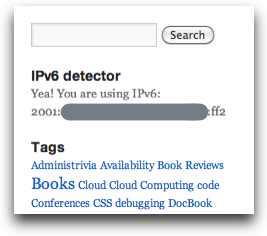
I’m using the “IPv6 detector” plugin for WordPress by Andres Altamirano, although I did alter it a bit. I shortened the text that was printed for an IPv6 address so that it would fit in my theme’s sidebar. I also removed the URL link and removed the extra links about IPv4 exhaustion.
Installation was a snap, though… I just installed it into WordPress and then went to the Widgets area of my theme and dragged it into the location where I wanted it.
May 27
China Passes 900 Million Cell Phone Users! (Featured Blog)
Fascinating stats out of an article at TheNextWeb this week: China has become the first country to reach the 900 million mobile phone user milestone after amassing about 11 million mobile phone users in April alone, according to a report by the country's Ministry of Industry and Information Technology. More...
May 25
Skype Issues Official Statement About the End of Skype for Asterisk (Featured Blog)
Before writing my story yesterday about Skype killing off Skype For Asterisk, I had reached out to Skype's PR agency to see if there was any statement from Skype. There wasn't at the time, but today they sent over this statement from Jennifer Caukin, a spokeswoman for Skype... More...
May 24
FBI’s Newest VoIP Fraud Case Shows Danger of Social Engineering
As I note in that blog post, this wasn't a "VoIP security" attack as much as it was a social engineering attack. This group went to rather remarkable lengths to convince ITSPs that they were legitimate businesses to whom the ITSPs should extend credit... and then they abused that credit once it was given.
In the book, I talk about these issues of both fraud and social engineering. From a protection point-of-view, this latest fraud case really highlights the uncertainties in the "SIP Trunking" space (a topic I focused on in Chapter 5) and the need to perform adequate due diligence on the ITSPs from whom you are purchasing SIP connectivity. (Although, admittedly, this particular group went to such lengths that it is not surprised they duped do many companies.)
The reality is that as the market for Unified Communications and IP communications continues to grow and expand, it will only become more tempting for scammers and thieves... so I expect we'll see even more fraud cases in the time ahead.
May 20
My Github repo of SMSified experiments
 Earlier in the week I mentioned a quick python app I wrote to send SMS messages using SMSified. I’m storing that code and some other experiments up in a Github repo at:
If you are a Github user and also interested in building SMS apps, please feel free to “watch” that repo and follow along with my own experiments. Code will probably be a mixture of python and Node.js, with occasional other languages thrown in.